Planning Account Management
You have dozens of online accounts — email, social media, streaming services, professional networks, shopping sites. Each one is a piece of your digital identity. When you're gone, these accounts need thoughtful handling. Some should be memorialized on social platforms. Others should be deleted entirely. Some might need to transfer to a Transfer Contact. Trust Blocks helps you specify exactly what should happen to each account, so your family doesn't have to guess.
What You Can Document
Account Identification
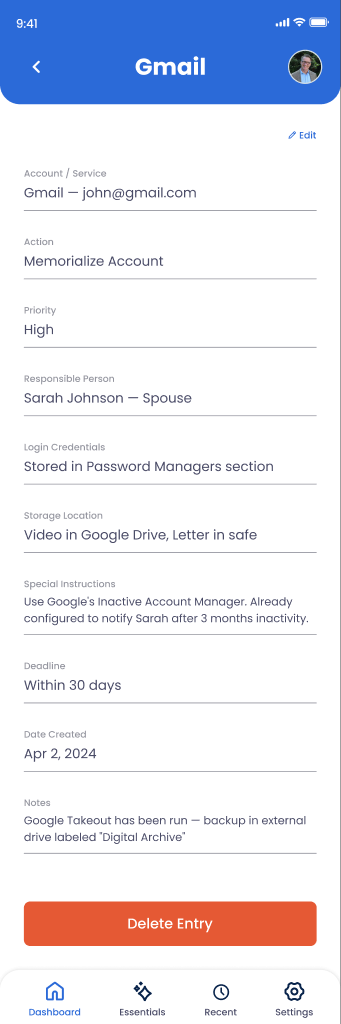
Service name, account email or username, account URL, and any account numbers or IDs.
Desired Action
Delete, memorialize, transfer ownership, keep active, or forward emails — your choice for each account.
Recipient or Handler
Who should execute this action — a Transfer Contact, executor, or specific person responsible for this account type.
Special Instructions
How to handle important content, subscriptions to cancel, or specific steps for memorial setup.
Financial Information
Subscription costs, recurring charges, or pending refunds that should be addressed during closure.
Content to Preserve
Downloads, exports, or backups that should be made before the account is deleted or transferred.
How to Document an Account
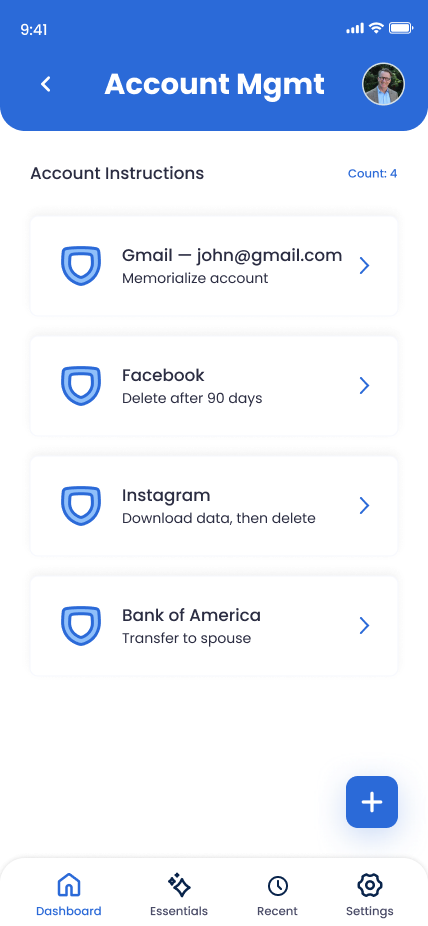
Go to Digital Legacy > Accounts
From your Trust Blocks dashboard, navigate to Digital Legacy and select Account Management. You'll see a list of accounts you've already documented and a button to add new ones.
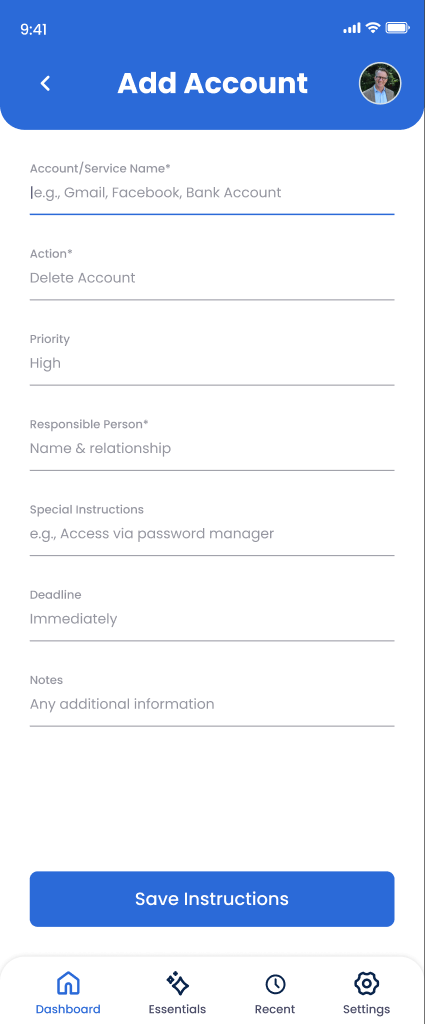
Click "Add Account"
Tap the add button to start documenting a new account. Trust Blocks guides you through a simple form to capture all relevant details.
Identify the Service
Enter the service name (Facebook, Gmail, Netflix, Spotify, etc.), your username or email, and the account URL if you have it. This makes it easy for your Transfer Contact to find the account.
Choose an Action
Select what should happen to this account: Delete (permanently close), Memorialize (turn into a memorial page on social media), Transfer (give ownership to a Transfer Contact), Keep Active (maintain the account), or Forward (redirect emails to someone else).
Assign a Transfer Contact or Handler
Choose who should handle this account. If it's being transferred, select the new owner. If it's being deleted, you might assign the executor or a tech-savvy family member. Different accounts need different handlers.
Note Any Special Instructions
Add context: "Cancel the annual subscription first and request a refund," "Download all photos before closing," "Set up a memorial page but keep the photos private," etc. Specificity helps your handler execute your wishes correctly.
Save and Review
Review the account details, then save. Trust Blocks stores everything with strong encryption. You can edit or delete accounts anytime as your needs change.
Managing Your Accounts
Why This Matters
Your online accounts are extensions of your identity. They contain memories (photos on Instagram), important information (Gmail), and connections (LinkedIn). Without clear instructions, your family faces months of administrative chaos. They don't know your passwords. They're unsure if you'd want Facebook to memorialize your profile. They might accidentally keep a subscription running and waste money.
More importantly, your accounts create privacy and legal complications. Some services have strict policies about account access after death. Without documentation, your Transfer Contact might violate terms of service trying to preserve your memories. By being explicit, you remove that guesswork and give them a clear, legal path forward.
Account management also protects your digital legacy. You get to decide if your emails stay private, if your photos are preserved, and who has access to your data. That's powerful control, and it's something most people never think about until it's too late.
Tips for Account Planning
Start with Social Media
Your social accounts are the most visible. Decide early what you want to happen to them — memorialize, delete, or transfer. Most major platforms have formal memorial processes, so document your preference clearly.
Don't Forget Subscriptions
That Netflix account you forgot about, the Spotify family plan, the streaming service you subscribed to once. Document them all, and mark them for cancellation so money doesn't keep flowing after you're gone.
Backup Important Content
If you want to preserve content from an account that will be deleted (like email archives or photo libraries), make sure your instructions specify how to back them up first. Don't just delete without preserving what matters.
Consider Digital Privacy Preferences
Some accounts contain sensitive information. Be explicit about privacy: "Delete all private messages," "Keep photos public," or "Only executor can access." Your preferences matter.