Planning Conversations & Closure
Some of the most important things we don't say are the ones we should. Trust Blocks lets you prepare final messages — words of encouragement, instructions, or closure — that can be shared with specific people when the time comes. Whether it's a heartfelt letter to a loved one, important instructions for a business partner, or a message to a friend, you can craft it now, when you're thinking clearly, and have it delivered exactly as you intended. This is digital legacy at its most human.
What You Can Document
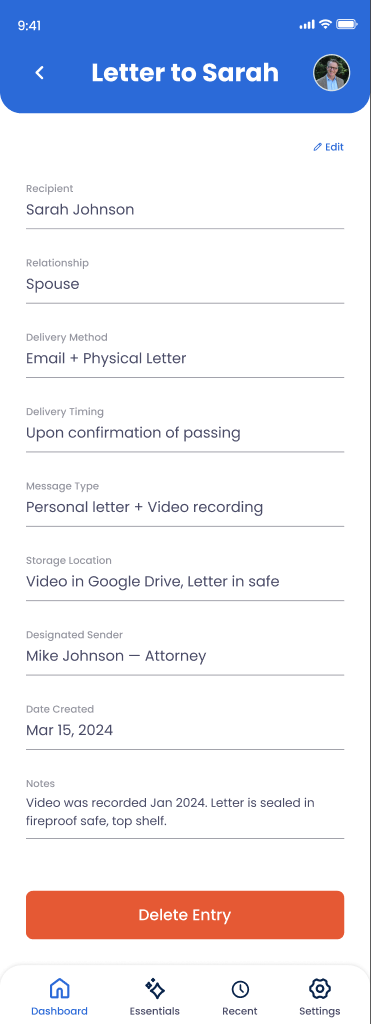
Recipient Details
Who should receive this message — name, relationship, and contact method (email, text, letter).
Message Content
The full text of your message — anything from a brief note to a lengthy letter. Write what's in your heart.
Delivery Method
How should this be sent — email, text message, printed letter, social media, or delivered in person by a Transfer Contact.
Delivery Timing
When should this be sent — immediately, after a waiting period, at a specific date, or only under certain conditions.
Context & Instructions
Any background or special instructions for how this message should be delivered or what should happen afterward.
Privacy Control
Mark whether this message is private (only the recipient sees it) or can be shared more widely if needed.
How to Create a Closure Message
Go to Digital Legacy > Conversations
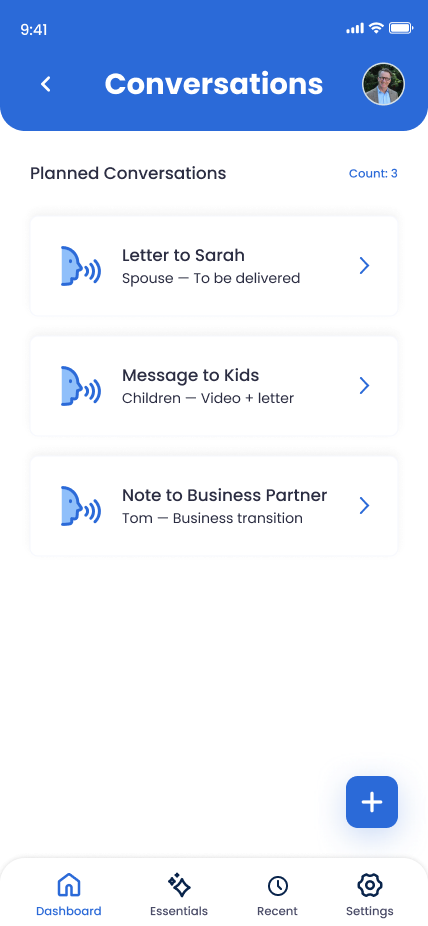
From your Trust Blocks dashboard, navigate to Digital Legacy and select Conversations & Closure. You'll see messages you've already prepared and a button to create a new one.
Click "Create Message"
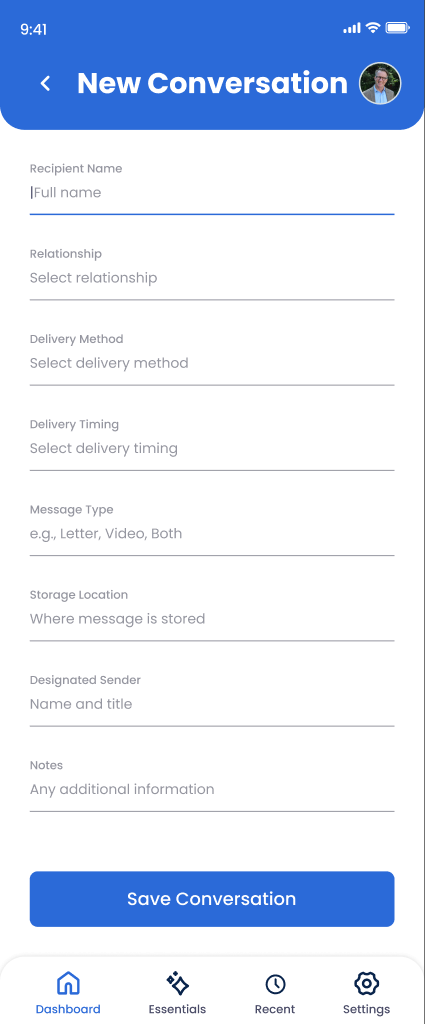
Tap the button to open the message creation form. Trust Blocks will guide you through who this message is for and how it should be delivered.
Choose Your Recipient
Select or add the person who should receive this message. You can type their name, email, or phone number. If they're already a Transfer Contact, they'll appear in your contacts.
Select a Delivery Method
Choose how this message should be sent: email, text message, letter, social media post, or person-to-person. Some methods (like email) can be automated; others will need a Transfer Contact to handle personally.
Compose Your Message
Take your time. Write what you want to say. This is your chance to share thoughts, feelings, instructions, or well-wishes. You can save drafts and come back to refine the message.
Set Delivery Timing
Decide when this should be sent. Immediately upon activation, after a delay (e.g., 30 days), on a specific date, or only under certain conditions. This gives you fine-grained control over the message delivery timeline.
Add Delivery Instructions (Optional)
If there's any special context the person handling delivery should know, add it here. "Print and place in a card," "send from my email account," or "deliver in person and wait for a response."
Save and Secure
Once you're satisfied, save the message. Trust Blocks encrypts it end-to-end. Only you can see it now. When the time comes, it will be delivered according to your specifications.
Managing Your Messages
Why This Matters
We often leave important things unsaid. "I'm proud of you." "I'm sorry we had that fight." "You're going to do amazing things." "Please take care of each other." These thoughts matter, but they're easy to put off until it's too late.
Trust Blocks gives you a space to say those things now. Not in a rushed moment, but thoughtfully, when you have time to choose the right words. You can craft messages that will bring comfort, clarity, or closure to the people who matter most.
This feature transcends digital legacy. It's a tool for presence. It's a way to say "I was thinking of you" when you can't be there to say it in person. And it's incredibly powerful.
Tips for Meaningful Messages
Be Specific and Personal
Generic messages lack power. Reference specific memories, inside jokes, or qualities you admire in the person. "Remember our camping trip in 2015?" hits differently than "I've always valued our friendship."
Mix Messages and Instructions
Some messages should be emotional. Some should be practical ("Tell my boss that files are on the shared drive"). Having both kinds creates a complete picture for your loved ones.
Don't Rush the Timing
Some messages are best sent immediately. Others need a waiting period so people have time to process. Messages to young children might be set to arrive when they're older. Choose timing that matches the message.
Reread Before Saving
These messages will be read at an emotional time. Reread them to make sure they say what you mean and won't cause confusion or hurt. Your words matter more than they normally would.