Planning Device Decommissions
Your devices contain some of your most sensitive information. Phones have text messages. Laptops have email archives. Smart home devices have your routines and habits. When you pass or become incapacitated, these devices need careful handling — some data should be preserved, but much should be securely erased. Trust Blocks helps you document exactly what should happen to each device, ensuring sensitive data doesn't fall into the wrong hands while preserving what matters.
What You Can Document
Device Identity
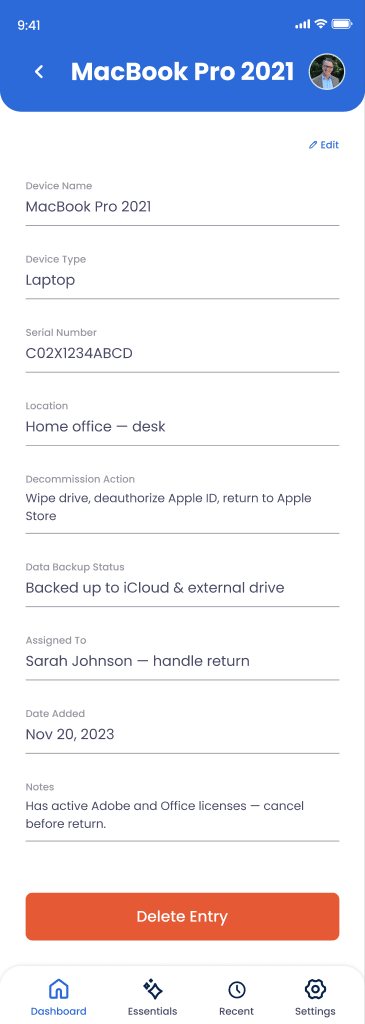
Device name (e.g., "My iPhone"), type (phone, laptop, tablet, smartwatch), operating system, and serial/IMEI number for identification.
Device Location
Where the device typically lives — home office, bedroom, car, work desk — so your Transfer Contact knows where to find it.
Authentication & Access
PIN, password, biometric setup, or other access methods needed to unlock the device securely.
Data to Preserve
Photos, messages, documents, or other meaningful data that should be backed up or transferred before decommissioning.
Data to Delete
Sensitive information, private photos, banking apps, or conversations that should be permanently erased.
Decommission Instructions
Specific steps for factory reset, donating, recycling, or destroying the device safely and securely.
How to Document a Device
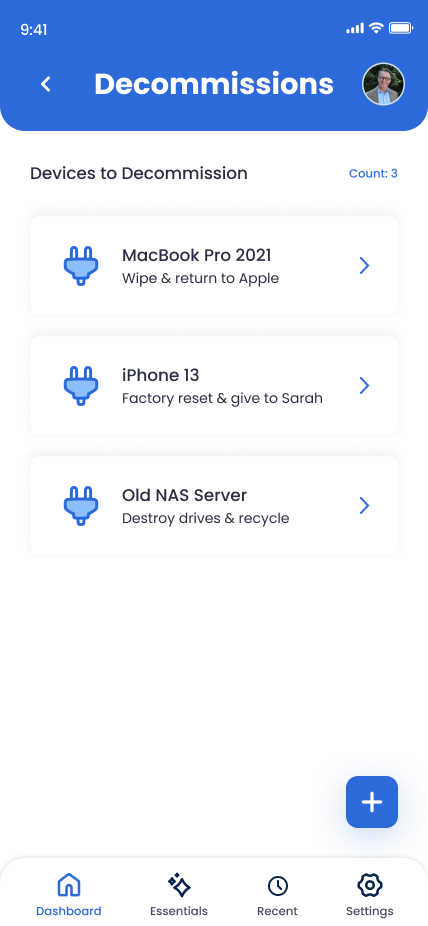
Go to Digital Legacy > Devices
From your Trust Blocks dashboard, navigate to Digital Legacy and select Device Decommissions. You'll see any devices you've already documented and a button to add a new one.
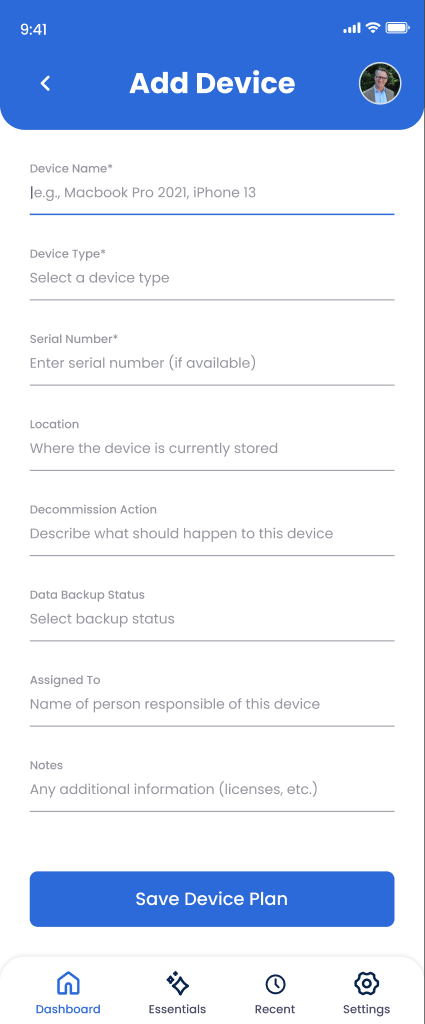
Click "Add Device"
Tap the add button to start documenting a new device. Trust Blocks will guide you through a series of questions to capture the full picture of what should happen to this device.
Describe the Device
Give it a name that's meaningful to you ("Work MacBook," "Home iPad"), select the device type, and if you know it, the operating system. Include the serial number or IMEI if you have it — this helps your Transfer Contact identifies the exact device later.
Document Access Credentials
Enter the PIN, password, or other authentication methods needed to unlock the device. Trust Blocks encrypts this information end-to-end so only you can see it in plain text. Your Transfer Contact will be able to access it when the time comes.
List Data to Preserve
Specify what's valuable on this device. "Photos in the Camera Roll," "Documents folder," "Messages with Mom." Be specific so your Transfer Contact knows exactly what to back up or transfer.
Mark Data for Deletion
List sensitive information that should be permanently deleted. "Private photos," "Banking app," "Email app with old messages." Being explicit protects your privacy and gives clear instructions.
Write Decommission Instructions
Provide step-by-step instructions for what to do with the device after data preservation and deletion. "Factory reset using Settings > Reset," "Donate to [Organization]," or "Destroy the hard drive and recycle the casing."
Save and Review
Review all device information, then save it. Your device decommission plan is now documented and encrypted in Trust Blocks. You can edit or delete it anytime as your devices change.
Managing Your Devices
Why This Matters
A single phone or laptop contains an astonishing amount of personal information — private messages, banking details, intimate photos, medical records, browsing history. Without clear instructions, your Transfer Contact faces an impossible choice: erase everything (losing precious memories and documents) or try to manually delete sensitive data and risk missing something.
Device decommission planning solves this. You're being explicit about what's valuable and what's sensitive. You're giving your loved ones both permission and protection. You're saying, "Archive these photos," "Delete this app," "Factory reset the device." Clear instructions prevent mistakes and honor your privacy even after you're gone.
This is especially important for devices with biometric authentication or complex passwords. Without your guidance, a locked device becomes inaccessible. With documentation, your Transfer Contact can do exactly what you wanted.
Tips for Device Planning
Document Every Significant Device
Your phone, laptop, tablet, smartwatch, and any other connected device that has your data. Don't forget older devices you're keeping around — they still contain data.
Be Specific About Sensitive Data
Don't just say "delete private photos." Specify where they are. "Private photos in a folder called 'Archived' in iCloud Photos." Specificity prevents accidental deletions of important data.
Update Passwords Immediately
If you change a device password, update Trust Blocks right away. Outdated credentials are useless and could slow down your Transfer Contact when they need to access the device.
Include Manufacturer Support Info
If a device is under warranty or has active support, note that. Your Transfer Contact might need to contact Apple, Samsung, or another manufacturer for assistance with decommissioning.