Managing Your Digital Privacy
Some things were never meant to be shared. Private thoughts in a journal. Sensitive medical research. Personal messages you don't want preserved. Trust Blocks' Digital Privacy section is where you specify what should be deleted, what should be preserved, and what should remain restricted even after you're gone. This is about protecting your privacy and honoring your wishes for the sensitive parts of your life.
What You Can Document
Data Type & Location
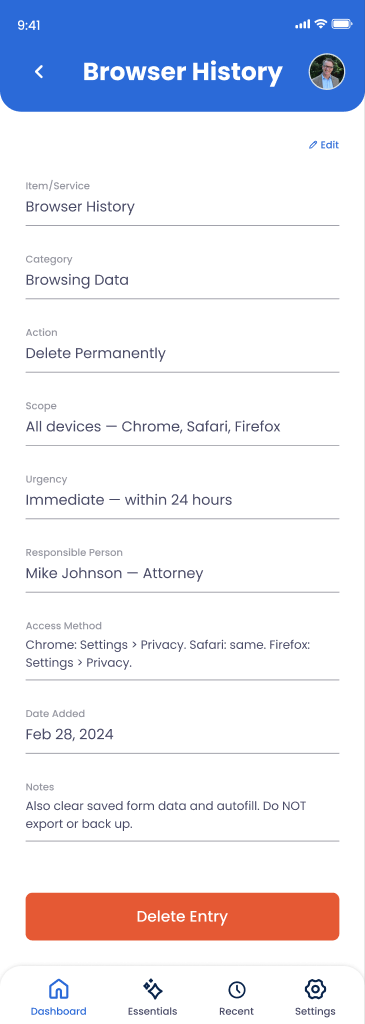
Browser history, email drafts, private messages, medical files, financial documents, or any other sensitive data and where it lives.
Desired Action
Delete permanently, preserve securely, restrict access, or archive with limitations. You control the fate of each category.
Reasoning & Context
Why this data should be treated a certain way. "Therapy notes are private," "Financial passwords should be deleted after access," etc.
Access Restrictions
Who can access what. "Only my spouse," "executor only," or "never share with anyone" restrictions for sensitive information.
Sensitive Content Flags
Mark what's particularly sensitive so handlers know to be extra careful. Alerts prevent accidental exposure.
Deletion Instructions
Specific steps for securely deleting data. "Wipe cookies folder," "securely erase browser cache," "use Shift+Delete," etc.
How to Document Privacy Preferences
Go to Digital Legacy > Privacy
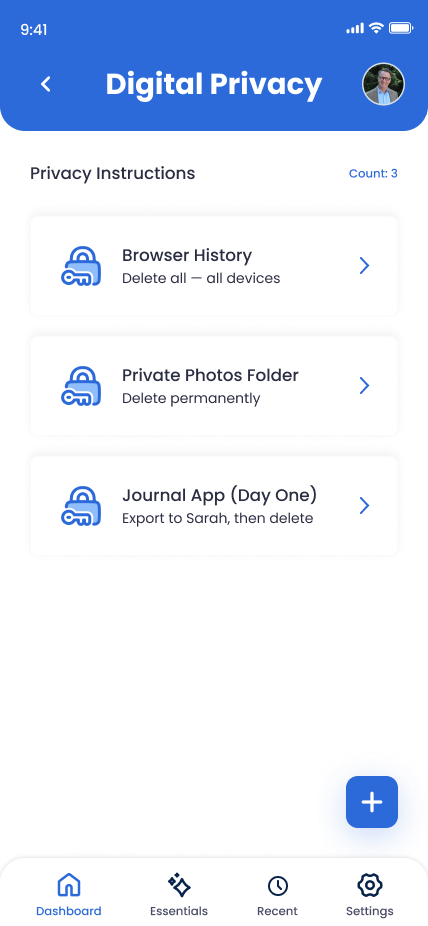
From your Trust Blocks dashboard, navigate to Digital Legacy and select Digital Privacy. You'll see a list of privacy entries and a button to add new privacy preferences.
Click "Add Privacy Entry"
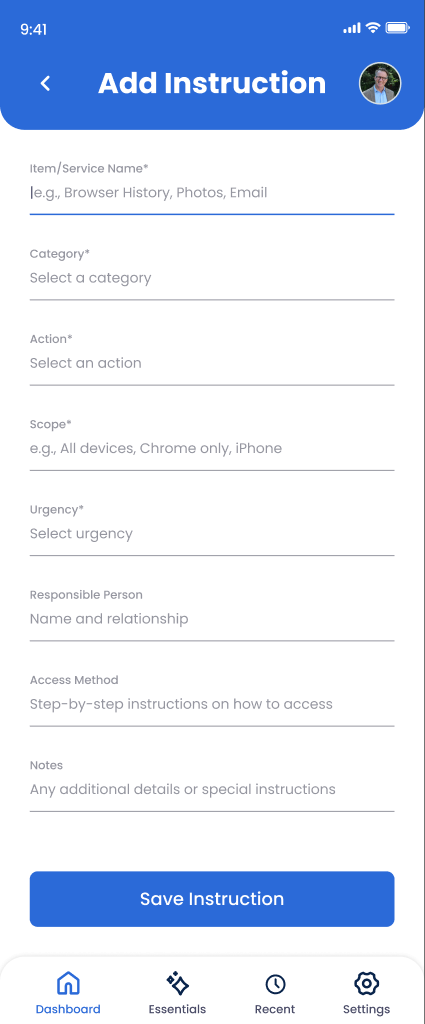
Tap the button to document a new privacy preference or sensitive data category. Trust Blocks guides you through a form to capture your requirements.
Identify the Data Type
Describe what you're protecting: "Browser history," "Medical records," "Private journal," "Therapy notes," "Password vault," etc. Be specific so there's no confusion about what needs protection.
Choose Your Action
Select: Delete (permanently erase), Preserve (keep but restrict), Restrict (only certain people access), or Archive (save offline and delete digitally). Different data needs different treatment.
Set Access Restrictions (If Applicable)
If you're preserving the data, specify who can access it. "Spouse only," "executor and attorney only," or "never share with anyone." Trust Blocks enforces these restrictions.
Document Your Reasoning
Explain why this data needs this treatment: "Therapy notes are confidential," "Financial passwords should be deleted after account access," or "This should never be shared." Context helps your handlers respect your wishes.
Add Deletion Instructions (If Needed)
If the data should be deleted, specify how: "Use secure wipe software," "Shift+Delete then empty trash," or "Contact the service to request complete erasure." Make deletion clear and complete.
Save and Review
Review your privacy entry for accuracy, then save. Trust Blocks encrypts this information end-to-end. Your privacy preferences are now documented and protected.
Managing Your Privacy Preferences
Why This Matters
Your digital life contains thoughts and information you never intended to share. Therapy sessions. Medical research. Deleted emails you didn't want to send. Private conversations. Without clear privacy instructions, your Transfer Contact might accidentally expose these to the world or be forced to choose between violating your privacy or breaking the law.
Digital Privacy preferences solve this. You're being explicit about what should be protected, what should be deleted, and who can access what. You're taking control of your narrative even after you're gone. You're saying, "These parts of me stay private. These parts are for sharing. These parts should cease to exist."
This is especially important if you have medical records, therapy notes, financial data, or any information that could embarrass your family or expose your private thoughts. By planning ahead, you protect not just yourself, but your loved ones too.
Tips for Privacy Planning
Start with Obvious Sensitive Data
Medical records, therapy notes, private messages. These are clear-cut. Document them first. Then move to trickier cases like browser history, old emails, or personal documents that might have nuanced privacy needs.
Think About Third-Party Data
Data about other people in your accounts (messages, photos of friends, group chats). Consider their privacy too. "Delete messages with my brother" respects both your privacy and his.
Be Specific About Locations
"Delete all browser history" is clear. "Delete emails from March 2020" is specific but narrower. "Preserve photos in 'Archive' folder" is actionable. The more specific, the better your handlers can execute.
Review Annually with Your Executor
Share your privacy preferences with the person who'll execute them. Make sure they understand your wishes and have the technical knowledge to carry them out. This prevents misunderstandings later.