Automatic Bill Payments & Recurring Charges
Life goes on after you're gone—or after you're hospitalized. But your bills don't stop. Insurance premiums, mortgage, utilities, subscriptions—they keep charging your accounts. Without a record of them, your trusted contacts could miss critical payments and damage your credit. Or waste money on services you don't use. Trust Blocks keeps it all organized.
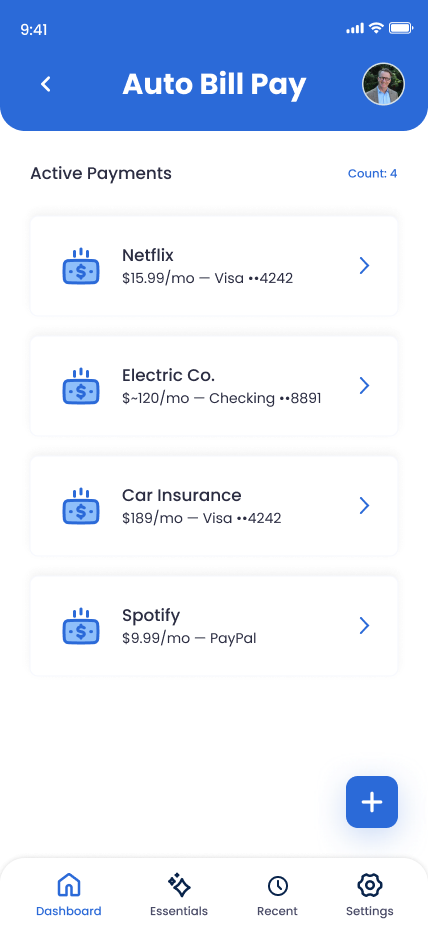
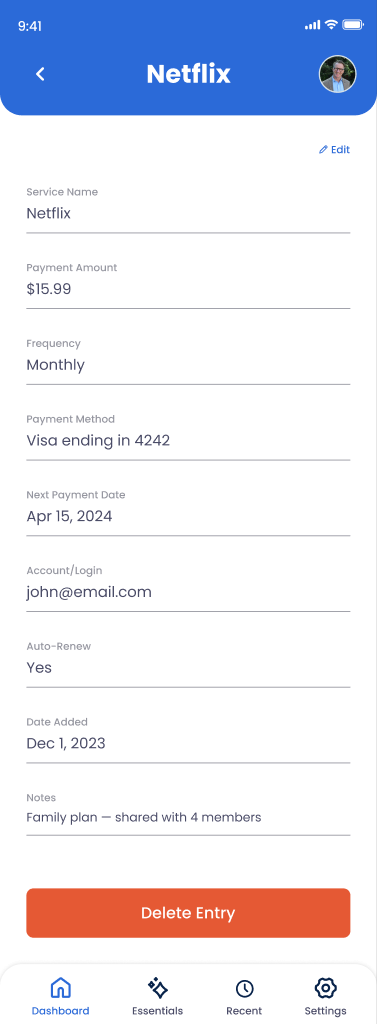
What You Can Store
Payee Name & Amount
Who you're paying (your mortgage company, insurance provider, utility) and how much each payment is.
Payment Schedule
Is it monthly, quarterly, annually? When is the due date? Is it on the 1st of the month or the 15th?
Payment Method
Bank account, credit card, or automatic transfer? Which account is it charging?
Account Number & Contact Info
How to identify this bill, the company phone number, and any account-specific notes.
Auto-Pay Status & Instructions
Is it set up to auto-pay, or does someone need to manually trigger each payment?
How to Pause or Cancel
Instructions for your trusted contacts to stop the payment if needed (after your account is settled).
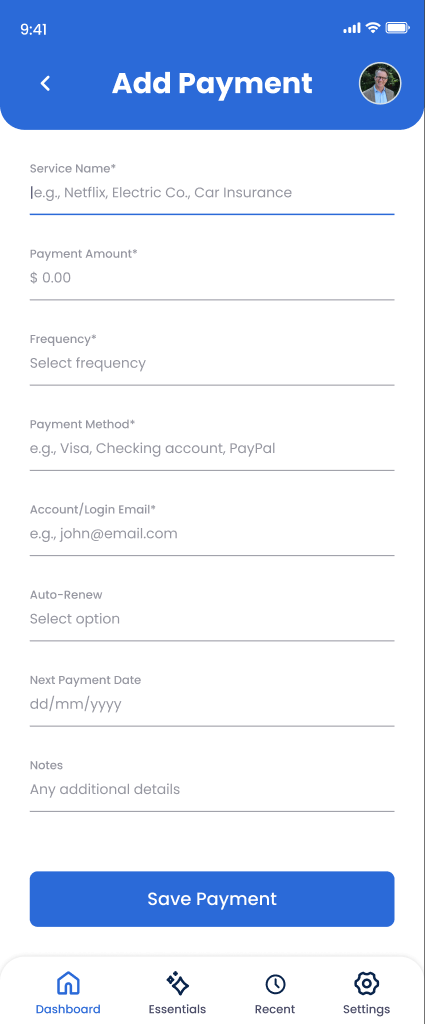
How to Add an Auto-Bill Payment Entry
Open Online Accounts and tap "Add Account"
Navigate to Online Accounts in Trust Blocks.
Select "Auto-Bill Payment" or "Recurring Charge"
Choose the category specifically for bills and recurring payments (not general online accounts).
Enter the payee name
Who are you paying? "State Farm Car Insurance," "Chase Mortgage," "Philadelphia Water Department," etc.
Record the payment amount and frequency
$1,200/month (mortgage), $156/quarter (insurance), $45/year (domain renewal), etc.
Add the due date and payment method
When is payment due each cycle? What account or card is it charged to?
Add contact details and cancellation instructions
Include the company's phone number, website, and account number. Write down exactly how to pause or cancel the payment.
Mark priority and set permissions
Tap "Save." Set this as high-priority so your executor sees it first. Choose who needs access (usually your executor or surviving spouse).
Managing Your Auto-Bill Entries
Update when amounts change
If your mortgage payment increases, your insurance premium changes, or your utility costs shift, come back and update the amount. Outdated information could catch your trusted contacts off-guard.
Delete paid-off or canceled bills
When you pay off a loan or cancel a subscription, delete the entry. Keep Trust Blocks current so your executor isn't trying to manage accounts that no longer exist.
Review your list quarterly
Once every three months, open this section and verify each bill is still active and the amounts are correct. It's a small habit that prevents chaos later.
Why This Matters for Your Digital Legacy
Here's a scenario that happens to real people: Someone passes away, and their estate is in probate. But their monthly mortgage payment continues—automatically debiting the estate account. Their insurance renews. Their utilities keep billing. Their streaming subscriptions keep charging.
Without a list of these recurring charges, the executor doesn't know they're happening. The estate hemorrhages money for months or years. By the time it's discovered, thousands of dollars have been wasted. The credit card company might dispute some charges, but not all.
By documenting every auto-pay and recurring bill here, you're giving your executor a roadmap. They can immediately cancel unnecessary subscriptions, manage critical payments like insurance and mortgage, and prevent waste. You're also protecting your credit—by ensuring bills don't go unpaid and accounts don't go into default.
Key Tips
Prioritize the critical ones
Home, car insurance, and utilities are life-critical. Document those first. Streaming services and hobby subscriptions can wait—but do them eventually.
List everything, even small charges
That $5/month domain renewal or $9/month cloud storage might seem trivial, but collectively they add up. And your executor needs the full picture.
Include payment method details
Is this charged to a credit card that might get canceled? A bank account that might be frozen? Note it—so your executor knows what to do.
Check your credit card and bank statements
The best way to find all your recurring charges is to review 3-6 months of statements. You'll be surprised what you forgot about.