Cryptocurrency Holdings & Wallet Access
If you hold cryptocurrency, there's no customer service number to call if you're locked out. There's no "forgot password" reset email. If you lose your keys, your coins are gone forever—and your trusted contacts will never access them. Documenting your holdings and access methods in Trust Blocks is the only way to ensure your crypto isn't lost.
What You Can Store
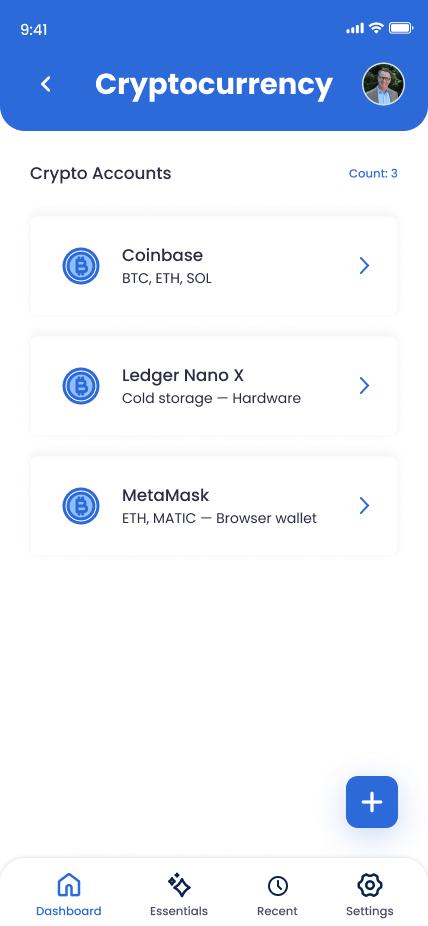
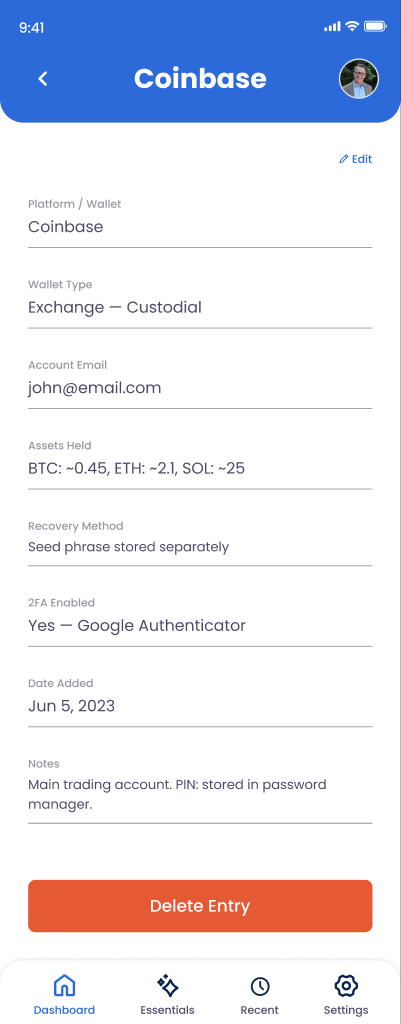
Exchange & Wallet Names
Which exchanges (Coinbase, Kraken, Gemini) or wallets (MetaMask, Trust Wallet) hold your crypto?
Access Credentials
Email, username, and account ID for each exchange (not passwords—see next item).
Seed Phrases & Private Keys (Location Only)
DO NOT paste the actual seed phrase here. Instead, note WHERE you've stored it (safe deposit box, physical backup).
Wallet Type
Is it a hot wallet (online), cold wallet (offline), hardware wallet (Ledger, Trezor), or exchange account?
Holdings Summary
What crypto do you hold? Bitcoin? Ethereum? Stablecoins? A rough estimate of holdings (not exact amounts).
Recovery Instructions
Step-by-step guide for accessing the wallet, selling holdings, or transferring to an executor's account.
How to Add a Cryptocurrency Entry
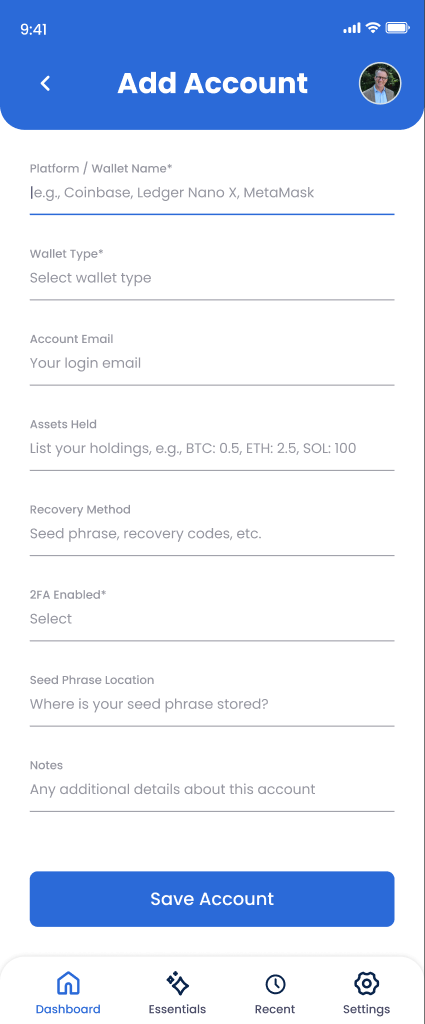
Open Online Accounts and tap "Add Account"
Navigate to Trust Blocks' Online Accounts section.
Select "Cryptocurrency" or the specific exchange
If your exchange (Coinbase, Kraken) is listed, select it. Otherwise, choose "Custom Crypto Wallet."
Enter the exchange or wallet name
Coinbase, Kraken, MetaMask, Ledger Nano X, etc. Be specific if you have multiple wallets.
Add your login email and account ID (not password)
For exchanges, include the email and account ID. For wallets, include the wallet address (public key is fine).
Document seed phrase location (don't paste it)
Write where your seed phrase is stored: "Written in sealed envelope in office safe" or "Stored on Trezor hardware wallet."
Describe what crypto you hold
List your holdings: "2 Bitcoin, 15 Ethereum, 1000 USDC" (or rough estimates if you prefer privacy).
Write recovery instructions
Step-by-step: "Use seed phrase to access MetaMask, then transfer holdings to executor's Coinbase account." Make it clear and testable.
Save and set strict access permissions
Tap "Save." Limit access to your executor or closest trusted contact only—this is highly sensitive information.
Managing Your Cryptocurrency Entries
Update holdings regularly
When you buy or sell crypto, update the entry with your new holdings. Keep it current so your executor has accurate information.
Test your recovery instructions
Actually walk through your recovery process once. Can you access the wallet? Can you transfer funds? If you're stuck, your executor will be too.
Never paste seed phrases or private keys
Even in Trust Blocks. Your seed phrase is the master key. Keep it offline, in a physical safe or hardware wallet. Only record its location here.
Delete old or inactive wallets
If you close an exchange account or migrate holdings, delete the old entry. Keep your list current.
Why This Matters for Your Digital Legacy
Cryptocurrency is fundamentally different from traditional assets. There's no "forgot password" button. There's no bank that can recover your account. If your seed phrase is lost and no one knows where it is, your holdings are gone forever.
Real-world tragedy: Someone held $500,000 in Bitcoin. They died without telling anyone where the seed phrase was stored. Their heirs spent years (and tens of thousands in legal fees) trying to access the wallet. They never could. The money is still locked in that wallet, unrecoverable.
By documenting your holdings, access methods, and recovery instructions here, you're ensuring your crypto isn't lost to your heirs. You're also protecting yourself—if you forget where a seed phrase is stored or lose access to your hardware wallet, having detailed recovery instructions could save you thousands in recovery costs.
Key Tips
Use hardware wallets for large holdings
Ledger, Trezor, and similar devices are more secure than exchange accounts or software wallets. Your executor will need physical access to the device, which is fine—it's stored in your safe.
Redundancy for seed phrases
Consider splitting your seed phrase across multiple physical backups (sealed envelopes in different locations). Record those locations in Trust Blocks.
Don't store exchange passwords here
Account email and ID are useful, but not the password. Exchange accounts can be reset via email if needed. Hardware wallets can't—the seed phrase is the only recovery method.
Create a "how to sell" guide
Your executor probably doesn't understand crypto. Write step-by-step instructions: "Transfer to Coinbase, go to Sell, choose USD bank transfer." Make it simple.