Security Questions & Secret Answers
Even in 2025, many services still use security questions as a backup for account recovery. "What's your mother's maiden name?" or "Where did you meet your spouse?" These seem low-tech, but they're critical—and they're vulnerable if they're predictable or lost when you can't recall them.
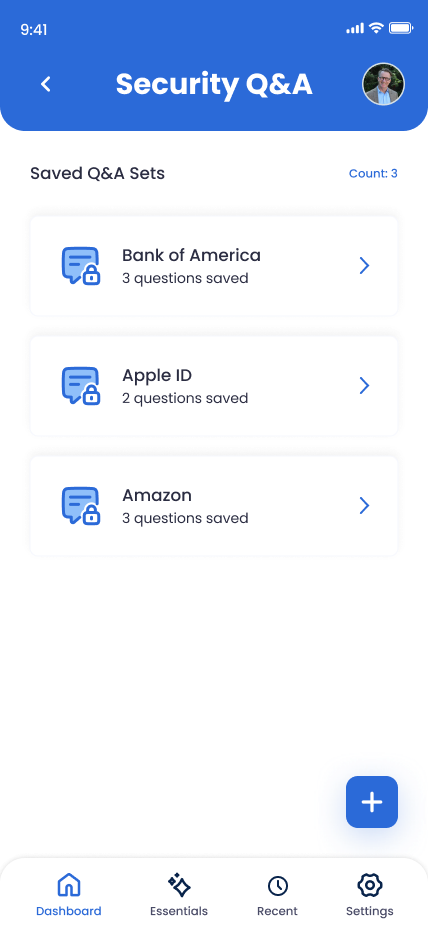
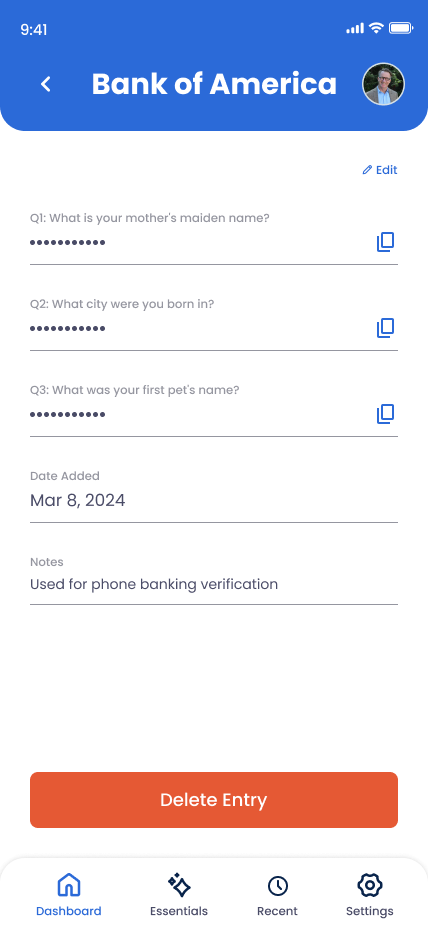
What You Can Store
Question-Answer Pairs
The exact security question and your answer, word-for-word (including capitalization and punctuation).
Service & Account Info
Which service uses this question (your bank, email provider, etc.) and what account it's tied to.
Backup Questions
Some services let you choose multiple questions. Store all of them here for completeness.
Custom Answers & Notes
If you used a fake or obscure answer for security, note down what it actually is (and why you chose it).
How to Add a Security Question Entry
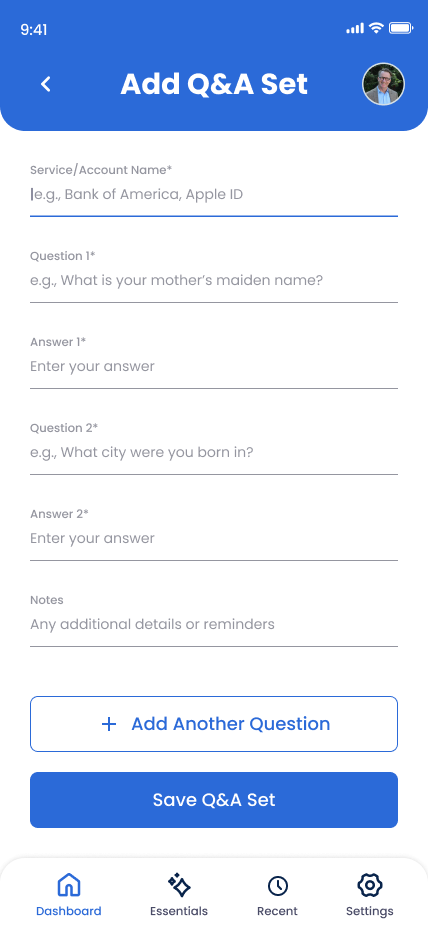
Go to Online Accounts and tap "Add Account"
Open Trust Blocks and navigate to the Online Accounts section.
Select the service or choose "Security Question"
If your bank or service is listed, select it. Otherwise, pick "Custom" and label it clearly (like "Bank of America Security Questions").
Enter the first question word-for-word
Type or paste the exact security question as the service displays it. Don't paraphrase.
Enter your answer exactly
Type your answer exactly as you entered it when setting up the account. If the service is case-insensitive, note that. If you use a nickname or fake answer, record it exactly here.
Add any additional questions
If the service has backup questions, add them in the notes section or create separate entries for each.
Add helpful context
Note if the answer is case-sensitive, if it's a nickname or fake name, or any other quirk your trusted contacts should know.
Save and set permissions
Tap "Save." These are sensitive—limit access to trusted family members who might need account recovery.
Managing Your Security Question Entries
Update if you change your answer
Some services let you update your security question or answer. If you do, come back here and update the entry immediately. Outdated answers won't help anyone.
Delete old questions for closed accounts
If you close an account or that service is no longer relevant, delete the entry. Keep Trust Blocks clean and up-to-date.
Organize by service
If you have multiple security questions for different services, use clear labels so your trusted contacts don't get confused.
Why This Matters for Your Digital Legacy
Security questions are old-school, but they're everywhere. Your bank uses them. Your email provider falls back to them. Many insurance and government portals still rely on them.
Here's the problem: if you memorized the answer years ago, do you remember it now? If you're gone, does anyone else know whether you used your real mother's maiden name or a fake one for security? Without this information, your trusted contacts can't recover critical accounts.
By recording these questions and answers here, you're filling a gap in your digital legacy. You're ensuring that even when a service doesn't have modern authentication options, your trusted contacts can still gain access when they need to.
Key Tips
Use fake or obscure answers
Never use your real mother's maiden name or other easily guessed information. Instead, use a passphrase or random answer—and record it here so it's not lost.
Note case sensitivity
Some services treat security answers as case-sensitive, others don't. If you're not sure, add a note so your trusted contacts won't get locked out by a capitalization mistake.
Check your critical accounts
Focus on high-value accounts first: email, banking, government services. Hobby sites can wait. Make sure the essentials are recorded here.
Ask if the service will stop using them
Many modern services are phasing out security questions. When you add a new account, see if it offers 2FA or passwordless login instead. Security questions are a fallback.