Adding and Managing Transfer Contacts in Trust Blocks
Trust Blocks lets you designate a trusted Transfer Contact who can request a transfer of your account and its contents after your passing.
7 mins Read
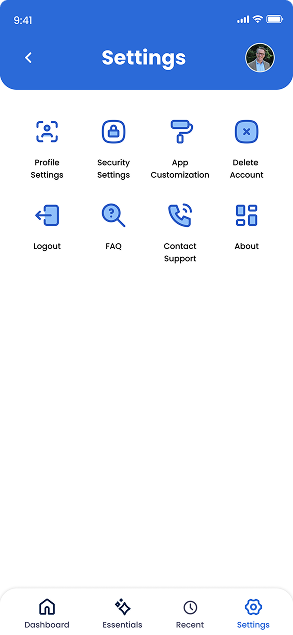
1. Access Your Account Settings
Click on the 'Settings' button and gear icon located at the bottom of your screen. It is the last button in the navigation bar. Once you click that, you will see a comprehensive screen of various account information that you can access and edit. Here you can update your personal details, change your security PIN, modify your subscription plan, manage notification preferences, and adjust privacy settings.
If you need to update your Transfer Contact information, you'll find that option here as well under 'Profile Settings'.
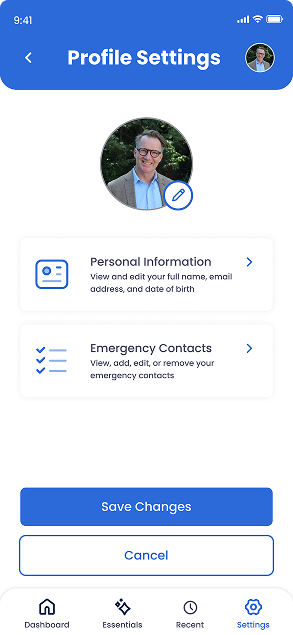
2. Click on ‘Profile Settings’
Once you click on 'Profile Settings', you will see various actions that you can take. This includes editing your profile picture, personal information, and Transfer Contacts.
Since you want to know how to add, edit, and manage Transfer Contacts, click on the tile that says 'Transfer Contacts'
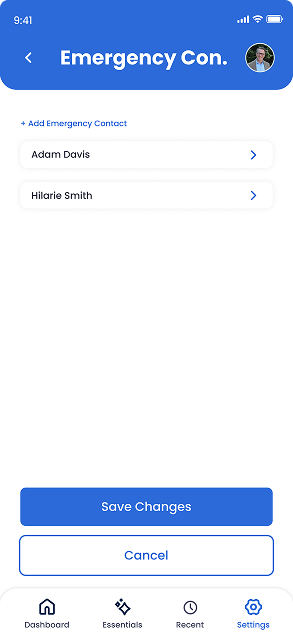
3. See List Of Transfer Contacts
On this screen, you will see a list of Transfer Contact(s) that you may have added. If you want to add a Transfer Contact, click on the '+ Add Transfer Contact' blue button at the top left of the screen. If you want to edit an existing Transfer Contact, simply click on their name to see their editable details.
Remember to click 'Save Changes' once you are done managing and editing your Transfer Contacts to ensure your updates are properly stored. Your Transfer Contacts will receive an email notification when they are added or if their information is updated
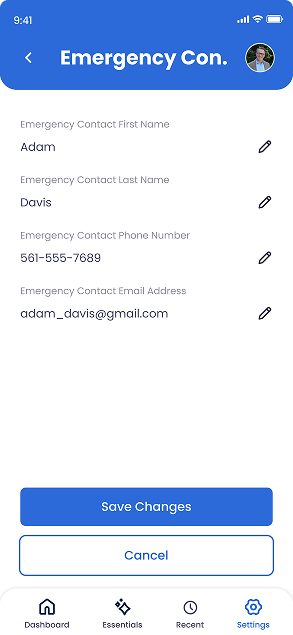
4. Edit A Transfer Contact
You will see this screen once you click on a Transfer Contact. Here you can update their name, phone number, and email address by tapping on the edit icon that looks like a pencil.
Remember to click 'Save Changes' once you are done managing and editing your Transfer Contacts to ensure your updates are properly stored.

Questions to Ask Your Attorney About Digital Assets
Plain-English questions to ask your attorney about digital assets, online accounts, cloud storage, crypto, and social media so your family can actually get in.

How to Protect Your Email Account From Being Taken Over
Learn how to protect your email account from takeover with strong passwords, two-factor authentication, and smart recovery settings in this plain-English guide.

How to Create a Secure Emergency Access Plan
Create a secure emergency access plan that lets a trusted Transfer Contact help in a crisis using only the access they need, while private accounts stay safe.

How to Inventory Your Online Accounts in One Afternoon
Learn how to inventory online accounts in one afternoon using your email, browser, statements, and app stores to build a clear, findable digital account list.

Conversation Starters for Advisors Discussing Digital Legacy
Use these digital legacy conversation starters to help clients plan passwords, online accounts, family access, documents, and incapacity with confidence.

What Advisors Should Know About Digital Assets in 2026
Help clients close the digital assets in 2026 gap. Learn why online account access is the real asset and how a Transfer Contact protects their family.

How Password Managers Are Becoming Part of Family Planning
See how password managers fit into family planning, from family plans and shared vaults to emergency access, master passwords, and naming a Transfer Contact.

How Trust Blocks Is Making Digital Estate Planning Easier
See how Trust Blocks simplifies digital estate planning, helping families organize accounts, devices, and a trusted Transfer Contact in one secure place.
Join Our Newsletter
Stay updated with the latest tips, news, and
insights from Trust
Blocks
