Bank
The Essentials Bank is the one your family will need first — typically a checking or savings account where bills and direct deposits flow. Document it here so emergency funds are never out of reach. Use Online Accounts › Financial Accounts for the rest.
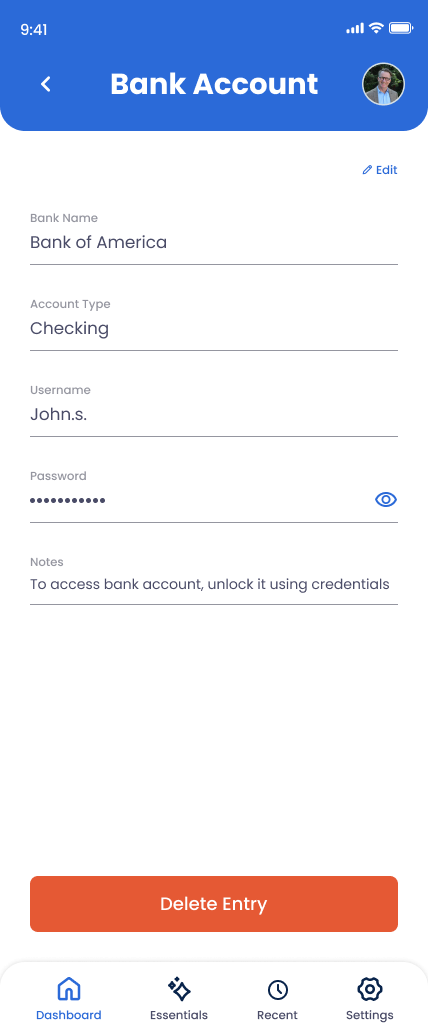
What You Can Store
Bank Name
The institution — Chase, Bank of America, Ally, your local credit union, etc.
Account Type
Checking, Savings, or Other. For multiple, add each as a separate Essentials entry or move secondary ones to Financial Accounts.
Username
The login username for the bank's online portal.
Password
The login password.
Notes
2FA setup, where checkbook is kept, branch contact, joint account holders, or anything else your family should know.
How to Add Your Bank
Open Essentials in the app
Tap Essentials and select Bank Account.
Enter the bank name and account type
Choose the type — Checking, Savings, or Other — from the dropdown.
Enter username and password
For the online banking portal. Encrypted and protected by your PIN.
Document 2FA in Notes
Most banks require a second factor — list whether it's SMS, an authenticator app, or a hardware token, and where backup codes live.
Save
Update if you change passwords or add joint account holders.
Why This Matters
When something happens, families need money to keep moving — funeral costs, mortgage, utilities, groceries. Probate can take months. The Essentials Bank Account gets your trusted contacts to the funds that keep daily life running before any legal process completes.